"I never said that." "Yes, I have the message." When exchanges are scattered across text messages, WhatsApp and e‑mail, one erased message is enough to blur the whole conversation. And when tension rises, nobody can show what was really said.
The Communication module of CoParent.ch answers with a simple idea: every exchange lives in a household thread, dated and signed, and nothing written in it can disappear. Here is what it offers, grouped by benefit.
One thread per subject, so every conversation stays clear
Each thread has a title and a subject chosen from a closed list: Health, School, Expenses, Custody and schedule, Activities or Other. The subject appears as a badge and works as a filter in the list and in search.
- Reply to a specific message: the reply quotes the original excerpt, and one click takes you back to the original.
- Mention a child: the text stays untouched, but the message carries a chip with the child's name. The "Everything exchanged about Léa" filter then gathers everything about that child, across all threads.
- Attach a photo or a PDF: up to 5 attachments per message, 10 MB at most each (JPEG, PNG, WebP, HEIC or PDF).
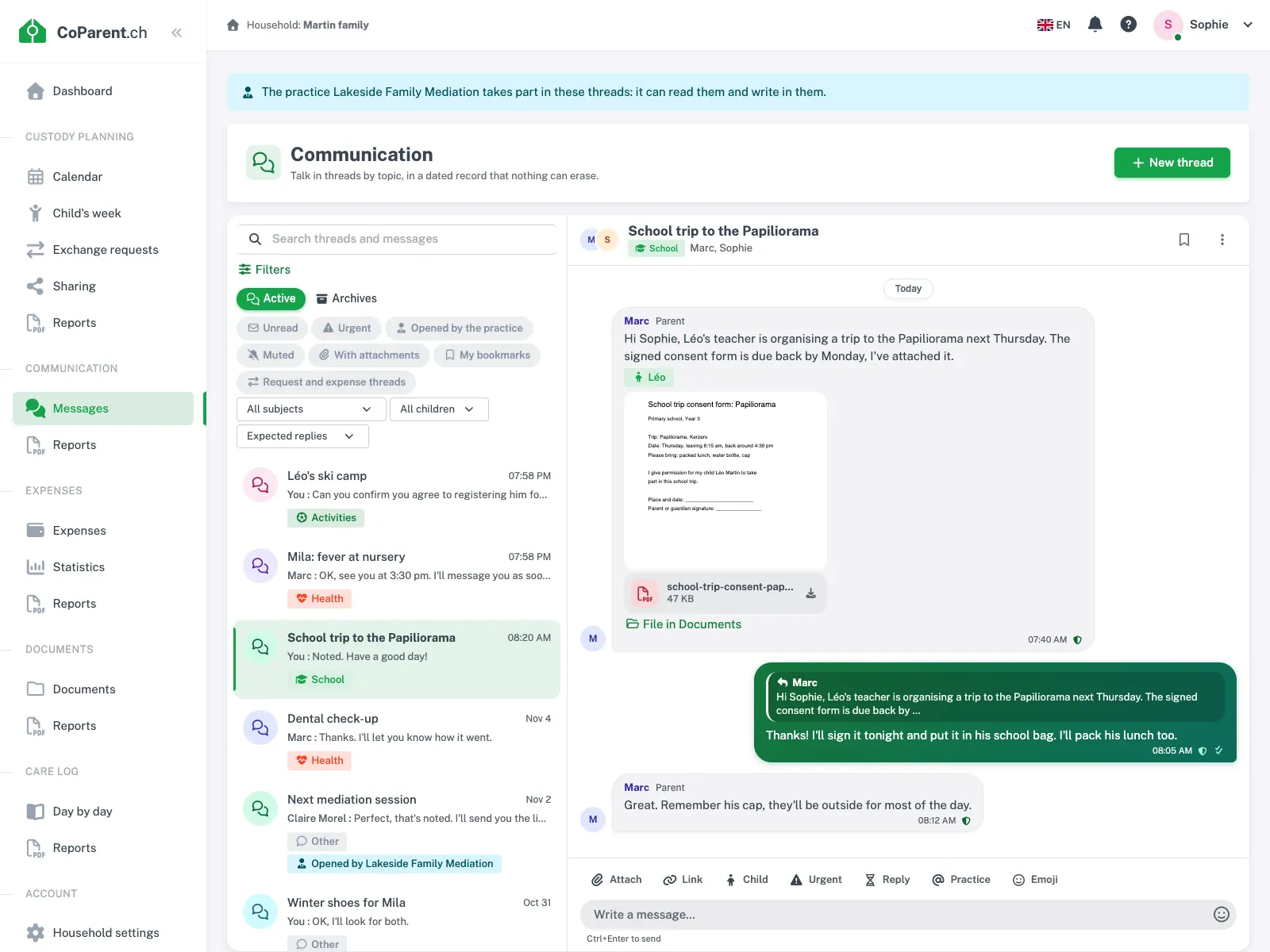
Search covers titles, messages and attachment names, archives included. You can narrow it by subject, author, period, child or attachment, and even run it without a keyword: "all messages with an attachment in the School year thread". The result opens the thread directly on the message found, even a very old one.
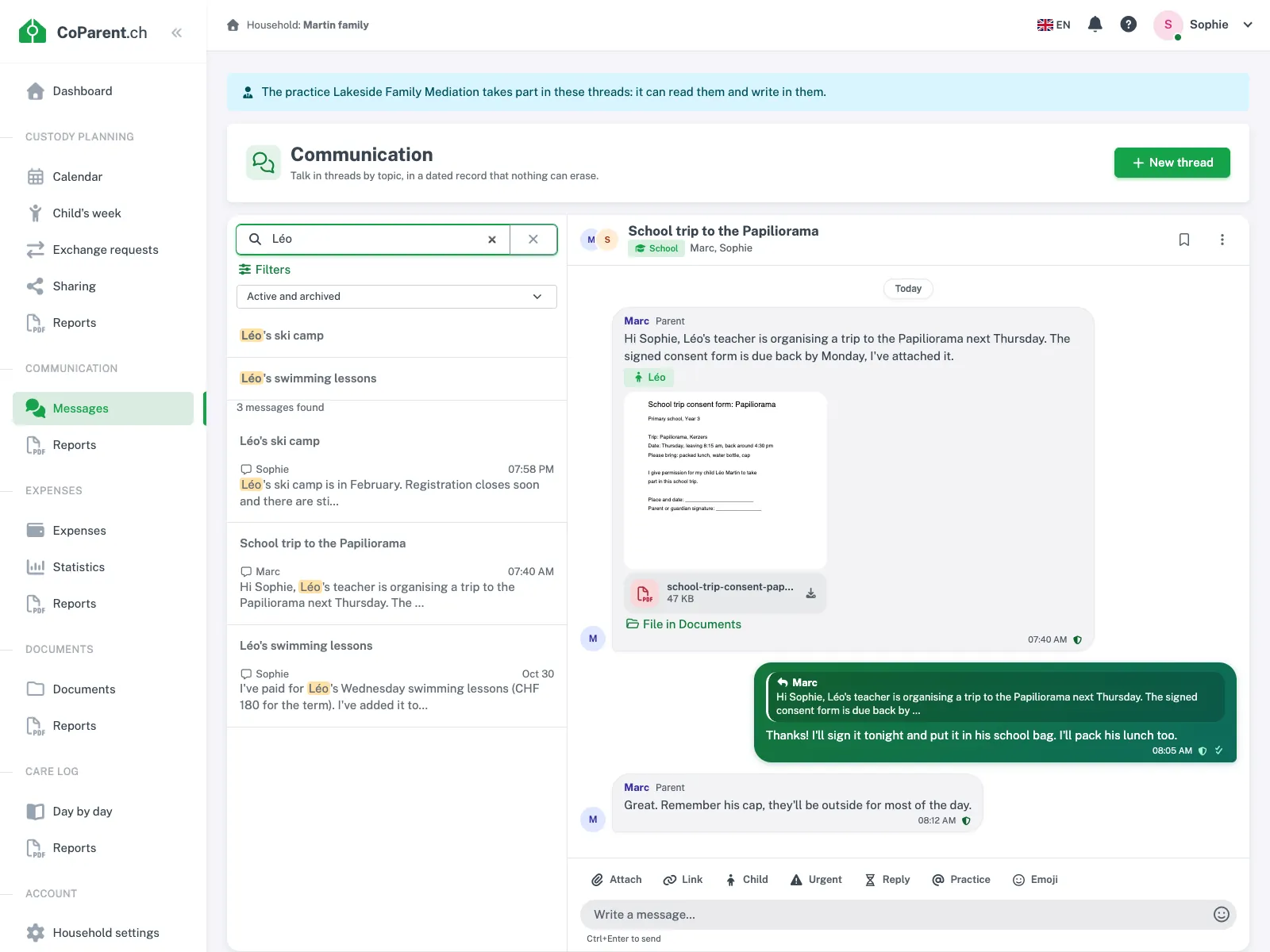
Nothing is erased, and you can verify it
Neither you, nor the other parent, nor a professional, nor the platform administration can delete a message, an attachment or a thread. There is no "unsend" either.
- Correction for 15 minutes, by the author only. The message carries an "edited" label, and every earlier version is kept with its time, visible to everyone who reads the thread.
- Shared archives: a parent archives a closed subject, and the thread becomes read-only for everyone. It stays readable, searchable and included in the reports, and a parent can reopen it.
- Read receipts that cannot be withdrawn: the author sees who read the message and when, and the first reading is the one that counts.
One limit to know about: erasing the household also erases its messaging, with all its data. This happens at your request, 90 days after the subscription ends without a new one, or if the operator resets the household. As long as the household exists, threads stay readable. If you stop the option and take it up again, they come back as they were.
A timestamped seal from an independent authority
Not being able to delete is one thing. Being able to show that nothing was changed is another. That is the role of the seal:
- Every message, every correction and every thread event (archiving, reopening, subject change) gets a digital fingerprint covering the text, the author, the time, the emergency flag, the children mentioned, the links and the attachments.
- Within the hour, these fingerprints are added to a household log to which one can only append. The log is signed and timestamped (RFC 3161 standard) by at least one timestamping authority independent of CoParent.
- Any later change, deletion or reordering is detectable. A full check runs every night, and a discrepancy alerts the administrators.
PDF reports come with an integrity certificate and a downloadable proof package. An expert can check it with standard tools, such as sha256sum and openssl ts -verify, without any access to CoParent. A message written less than an hour ago is marked "sealing in progress".
What this shows: the text, the author and the time of a message have not changed since it was sealed. It is a verifiable trace, not a guarantee about the outcome of any proceedings: it is always for the person examining the file to judge.
Know what is expected, and when
A message left unanswered often creates more tension than the disagreement itself. Two tools make expectations clear.
A reply expected before a deadline
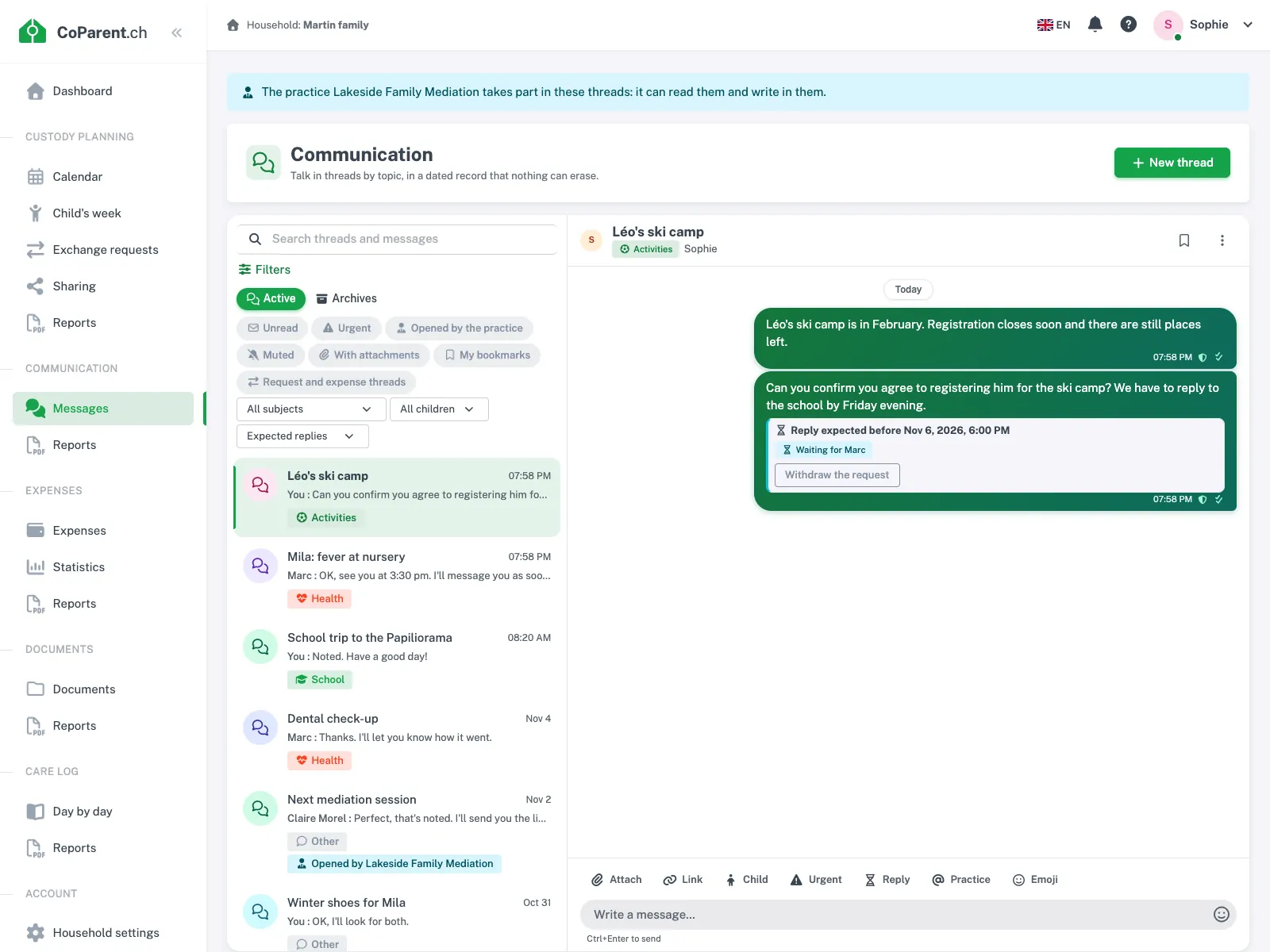
When you post a message, you can state that a reply is expected from the other parent before a deadline between 2 hours and 30 days. Everyone who reads the thread sees the deadline, the recipient and the state of the request: pending, answered (with the time), late or withdrawn.
- The request counts as answered as soon as the recipient writes in the thread, quoting or not.
- The recipient gets a reminder 24 hours before the deadline (halfway through if it is less than 48 hours away), even if the thread is muted.
- The author is notified at the deadline if nothing has come.
- The deadline can be neither changed nor erased. Its author can only withdraw the request, and the withdrawal stays visible.
Child emergency, which always gets through
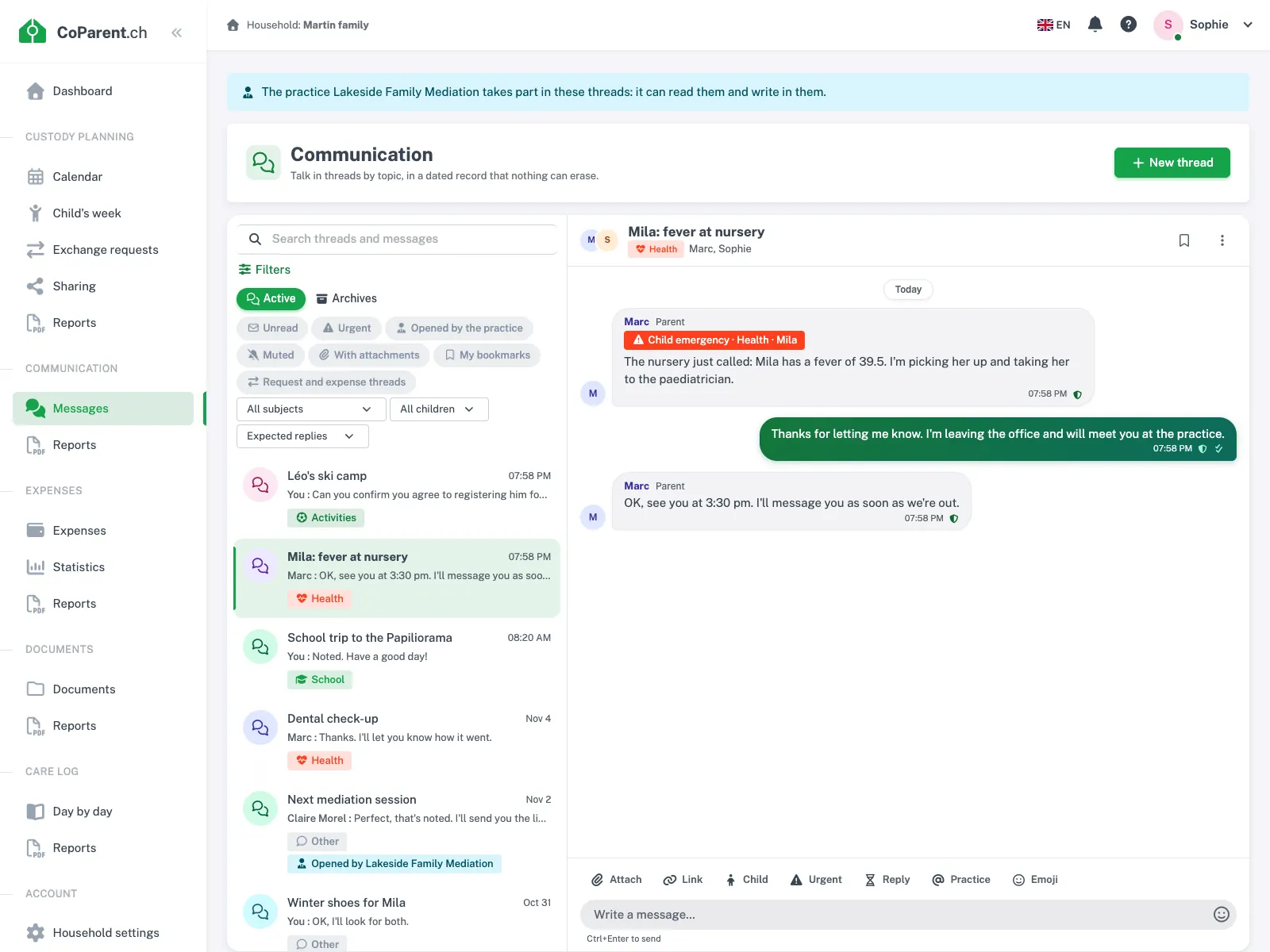
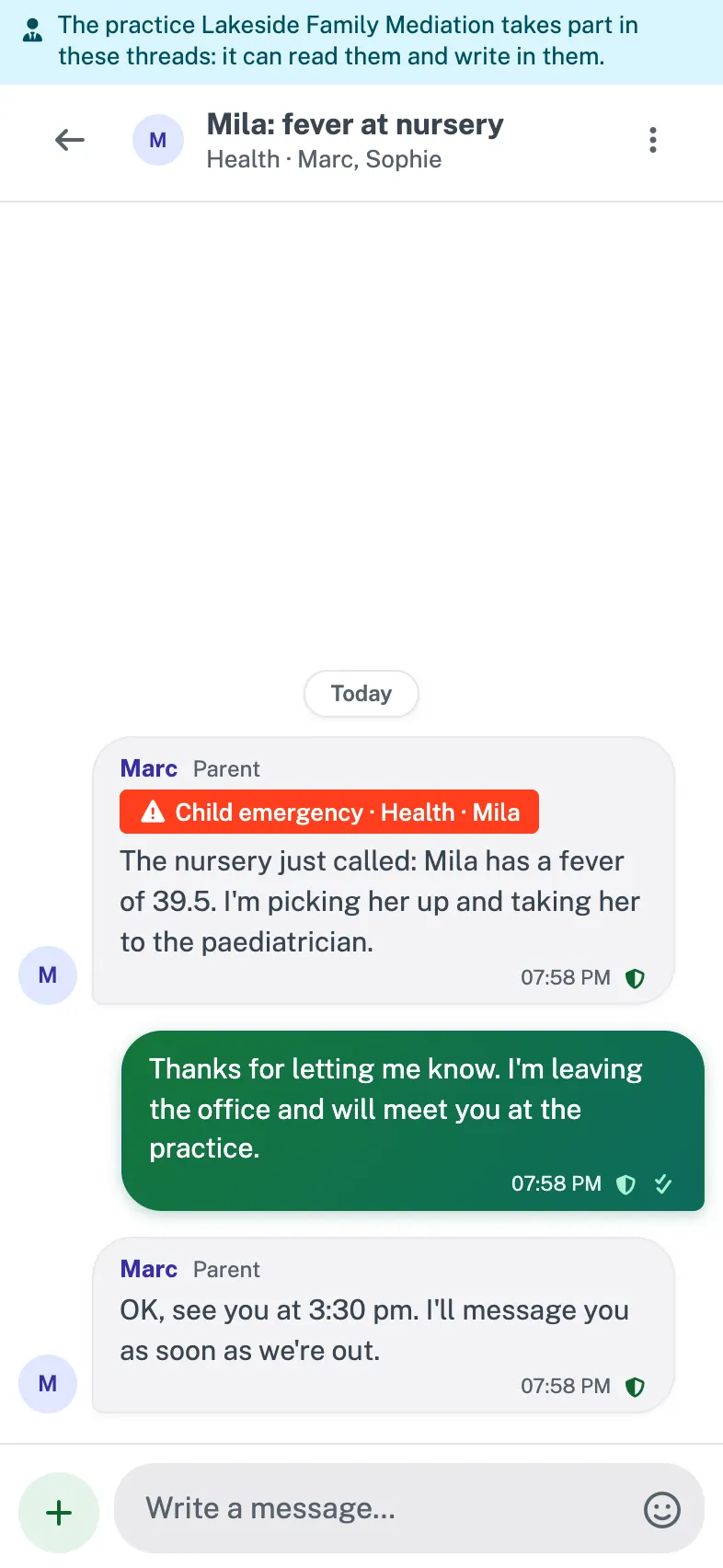
For a real emergency (a child with a fever at 11:40 pm, an accident, an unplanned pick-up), a parent can mark their message "Child emergency", with the child concerned and a reason: health, accident, safety, unplanned pick-up or other emergency.
- The other parent is notified even if the thread is muted, and even during their quiet hours.
- The flag can be neither withdrawn nor changed, and every emergency is recorded in the household audit log, without its text.
- To prevent abuse, each parent is limited to three emergencies per rolling 24 hours, and one every 15 minutes. Beyond that, the message can still go out without the emergency flag.
For everything else, each person stays in control of their own calm: muting silences a thread's notifications for 8 hours, a week or until further notice. It is strictly private, the other parent cannot see it, and the messages still count as unread.
Link the thread to the rest of the family's organisation
A message about "Saturday" or "the dentist's invoice" is clearer when it points to the item itself. A message can link up to five items from the space: a custody day, an appointment, an exchange request, an expense, a document or, for a parent, a care log entry.
Each link appears as a live card: it shows the item's current state, read from its module, and the state it had when it was linked. A card is shown only to someone who would see the item in their own module; other readers see only "Item not available". Reading a thread therefore gives access to nothing more.
From the thread, a parent can also:
- propose an exchange of custody days: the request is created in the space, and each decision (approval, refusal, counter-proposal) comes back into the thread as a system message;
- file in Documents a clean attachment, for example a prescription: a copy is placed in the chosen folder, and the file stays in the thread;
- note in the care log a useful message, such as "Dafalgan 5 ml at 6 pm": the form opens prefilled with the child, the time and the text.
These actions depend on the modules active in your household. A refused expense or exchange request also opens its own thread automatically, with the card at the top.
Checked attachments
A photo is re-encoded on receipt: the orientation is applied and the metadata is removed, GPS position included. Only this cleaned copy is kept. Every file is encrypted at rest and scanned by an antivirus before it is served; a PDF containing active content is refused. Thumbnails, a full-screen viewer and a preview of the first page of PDFs make reading easier.
Your mediator or firm can join the discussion
Two professional roles exist, with deliberately limited rights.
- A mediator who is a member of the space reads the threads and searches them, without being able to write, correct or archive. A mediator produces no read receipt.
- A firm mandated by the family (mediator, lawyer, guardian) reads all threads, writes in them, can open one, for example for a mediation discussion, and can set an expected reply for the parents. Every message is signed with the person's name and the firm's, and the messaging permanently shows that the firm takes part.
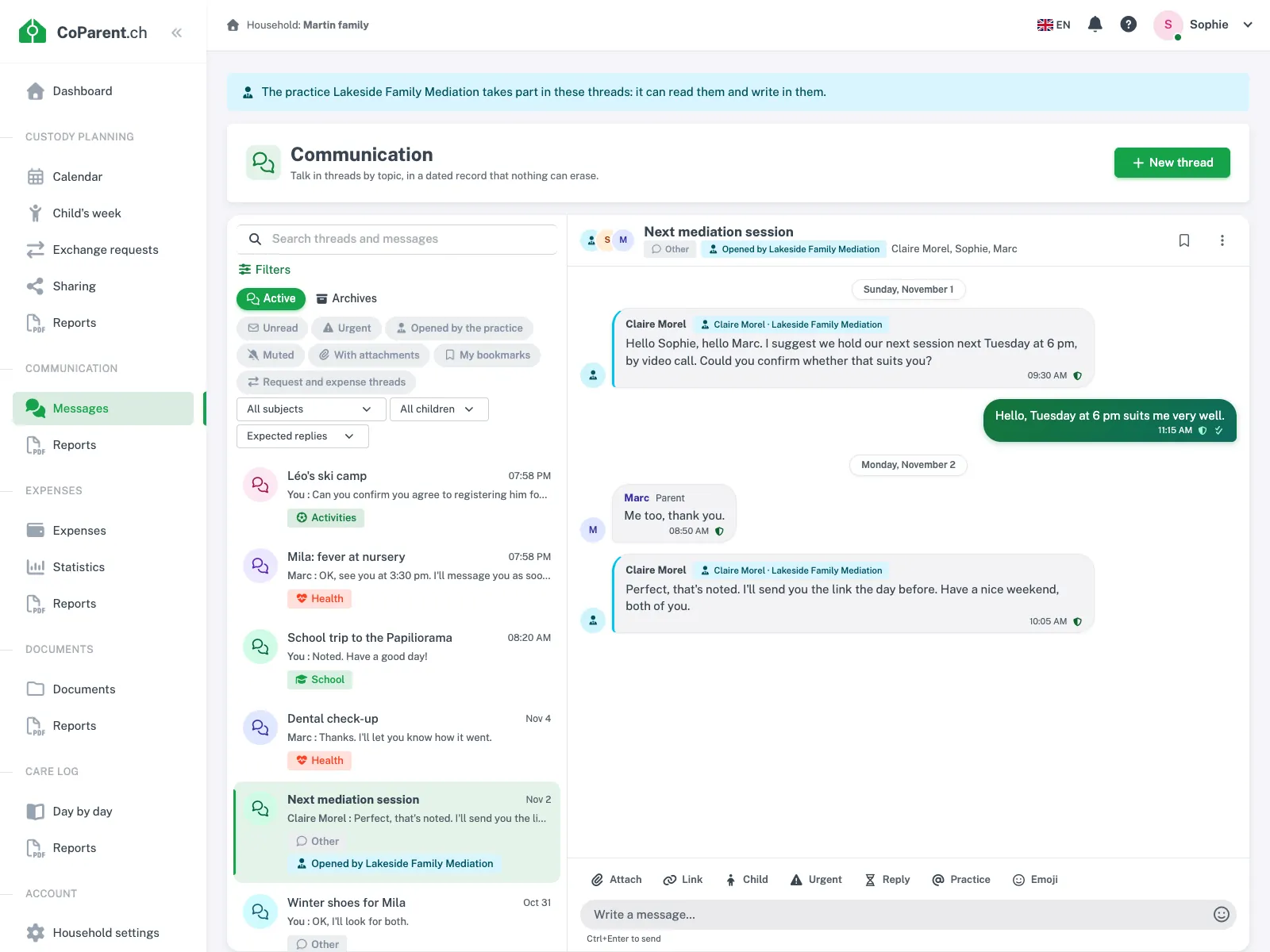
The family stays in control. Every thread consultation, every message, every search (without the terms searched) and every report downloaded by the firm appears in an access log visible to the family. If you revoke the mandate, access stops from the next request and the messages already written stay in the threads.
| Action | Parent | Mediator | Mandated firm |
|---|---|---|---|
| Read and search threads | Yes | Yes | Yes |
| Write, open a thread | Yes | No | Yes, signed by the firm |
| Set an expected reply | Yes | No | Yes, to the parents |
| Mark a child emergency | Yes | No | No |
| Archive and reopen a thread | Yes | No | No |
| Produces a read receipt | Yes | No | Yes, "Read by the firm" |
PDF reports with an integrity certificate
To prepare a mediation or document a situation, the messaging produces three PDF reports, plus the export of the messages you have bookmarked.
| Report | Content | Integrity certificate |
|---|---|---|
| Thread history | All messages in order, with author, role, date and time, original text of corrected messages, quotes, attachments, read receipts, archivings | Yes |
| Conversations over a period | The same content for every thread that received a message between two dates, archives included | Yes |
| Selected messages | The messages you have bookmarked, grouped by thread | Yes |
| Summary of exchanges | Per participant: number of messages, median reply time, share of messages read within 24 hours, expected replies, emergencies. No message text | No (no text) |
The history also shows, for each message concerned, the expected reply and its state, the emergency flag, the children mentioned and the linked items (according to the rights of the person requesting the report). The full household export contains the proof package for all of the household's messaging.
Made for daily life, on a phone as on a computer
- Live: new messages appear without reloading the page, with a "is typing" indication.
- Synced, private drafts: start a message on your phone, pick it up on your computer. The draft is encrypted at rest, and neither the other parent, nor the mediator, nor the firm can read it.
- Private bookmarks, to find an important message again with the "My bookmarks" filter.
- Reliable sending when offline: a message written on the train stays "pending", then goes out when the network returns, once only and in order. The time shown is the time of publication by the server.
- Full screen on a phone: the messaging fills the whole screen like a messaging app, with the input area above the keyboard.
- Push notifications as soon as a message arrives; if it is still unread after an hour, one e‑mail per thread gathers the unread messages.
- Four languages: the interface, system messages, notifications and reports exist in English, French, German and Italian. The text of messages is shown exactly as it was written.
What the messaging deliberately does not do
Some common features are absent by choice:
- no deletion and no unsending of a message;
- no emoji reactions on a message;
- no "online" indicator and no "last seen": only the ephemeral "is typing" and per-message read receipts tell you anything about a parent's activity;
- no calls, no call recording, no voice message without a written transcript kept.
These absences are a choice to calm exchanges: here you write, you read, and you keep a record, with no pressure to be present or to answer at once.
Hosting, price and trial
Messages and attachments are hosted in Switzerland and included in your household export. Data is processed under the Swiss nFADP and the GDPR. In the app, only household members and the professional you have appointed yourself can access them. No advertising, no resale, no third-party trackers.
Communication is an option: CHF 4.- per month or CHF 40.- per year, on top of the base subscription (CHF 8.- per month for both households). One subscription covers both households: the other parent pays nothing. The option is open during the free trial, no credit card needed. Details are on the pricing page.
To see the module in detail, visit the Communication module page, or start the free trial. And if you are looking for advice on writing to each other well, whatever the tool, read our guide on communication between co‑parents.